Detailed description
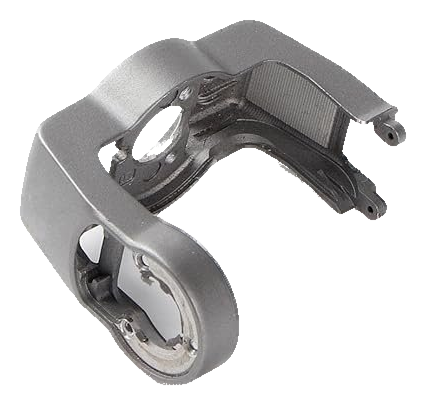
Gimbal lower bracket for DJI Air 2S. The bracket supports part of the gimbal and maintains the camera assembly’s mechanical geometry.
Choosing the part
Compare the installation level, arm or frame shape and mounting points. Confirm whether the listing supplies only the bracket or also components attached to it. The model is DJI Air 2S, sometimes listed as Mavic Air 2S. DJI Mavic Air 2 requires a separate compatibility check.
Installation and checks
Following an impact, inspect adjacent parts so the replacement is not fitted to a distorted structure. Check gimbal movement after assembly and calibrate if the repair requires it.
When reusing screws, check length and thread condition so the fasteners do not press against components behind the support.
Questions before buying
Does the bracket include the components attached to it? Do not assume so from the name. Check the supplied-parts list and photo for motors, dampers, sensors and screws; a bracket listing primarily identifies the supporting structure.
Why does bracket geometry matter? Hole positions and the supporting plane set the alignment of attached components. After an impact, inspect the adjacent mounting surface too: fitting a new bracket to a distorted base can leave mechanical stress or unwanted contact between moving parts.
Buying from DronExpert in Moldova
The current MDL price and availability are shown on this product page. To match the version, contact DronExpert in Chișinău with your equipment model and SKU 10256.